
Lead tracking software that captures, validates and scores every enquiry
Lead capture and validation should be the part you never worry about. The enquiry is written to the database before anything else runs, so you never lose a lead to a slow API or a dropped webhook — then validation, deduplication and scoring do their work behind that write.
Unlimited users on every plan. Cancel any time. Built in the UK.
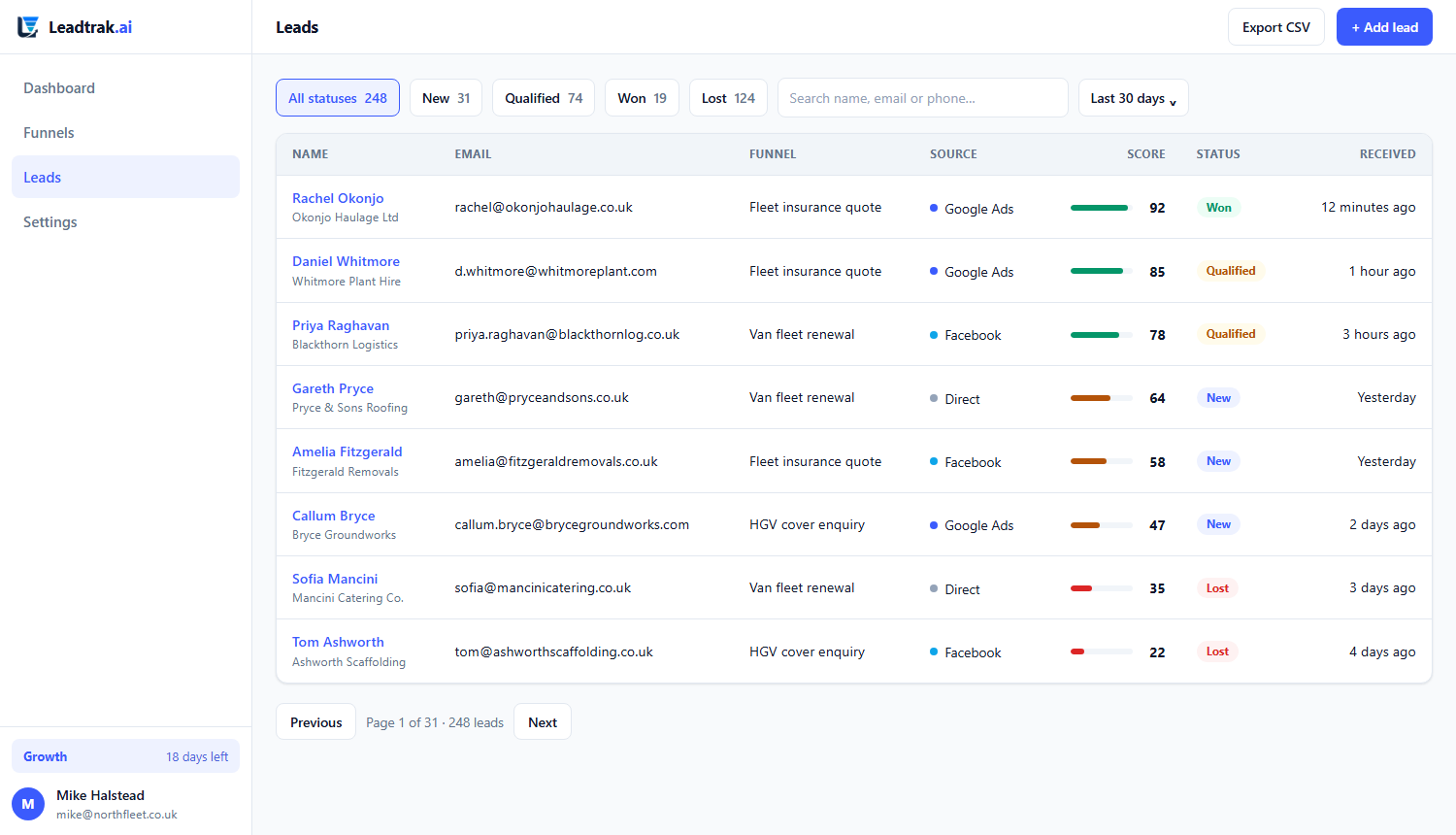
The lead inbox — every enquiry, scored and sorted by qualification.
Lead capture and validation
The write happens first, the clever bits happen second
Most lead tracking software validates the email before it saves the lead. If the validator times out, the lead is gone. We do it the safe way round.
Written before anything else
When a lead submits, the row hits the database first. Validation, deduplication and enrichment run behind that commit. If a third-party call is slow or fails, you still have the lead — it is sitting in your inbox, waiting for the rest of the job to finish.
A lost lead is a refund you cannot claim
You paid for the click that produced that enquiry. Dropping it on a technicality is the most expensive bug in marketing, because it is invisible. Lead capture and validation built around a first-write design is how we make that bug impossible rather than merely rare.
What the software does
The steps every lead goes through, automatically
None of this needs configuration. It is the default path from submission to a scored, routable lead.
Capture on any channel
Funnels, your site forms, and inbound from integrations all land in the same inbox. You are not reconciling a spreadsheet from the website against a list from the ad platform — it is one queue.
Validate the contact
Email and phone are checked for plausibility and known-bad patterns. You still keep the lead, but it is flagged so your team spends its first call on a number that rings.
Deduplicate
A returning visitor who enquired last month is matched to their earlier record, not stacked as a second lead. Your counts stay honest and your follow-up stays sane.
Score from the funnel weights
The scoring weights you set in the builder total into a lead score the moment the submission lands. A “within 30 days, budget over £10k” lead floats to the top without a human reading it.
Route by score and source
Hot leads can be pushed to a CRM, a Slack channel or a teammate the instant they qualify. The work goes to the right person while the lead is still warm, not after a morning batch job.
Never per-seat
Unlimited users on every plan, including free. Add your whole sales pod, your manager and the apprentice without a pricing conversation. You are charged on leads, not logins.
The inbox
Find the leads you care about, then act on all of them at once
The lead list is not a dumb table. Filter it down to exactly the enquiries you are chasing, sort them the way you actually work, and change the whole selection in one go — with the same audit trail you would get doing them one at a time.
Filter by what matters
Status, free-text search, score band, source, which funnel produced the lead, who owns it (including “nobody yet”), and a date range. The date range is inclusive of the last day, so “to the 7th” means the whole of the 7th, not up to midnight the night before.
Sort the way you work
Newest first, oldest first, highest score, or lowest score. Oldest-first is the one that matters: it surfaces the enquiry that has been sitting there longest, which is the one about to be lost.
Bulk assign and bulk status
Tick the leads, pick an owner or a status, apply. Up to 200 at a time. Every change is written through the same code path as a single change, so each lead gets its own timestamped activity entry naming who did it — a bulk action never leaves a silent gap in the history.
Save a view, pin it to the sidebar
Set up the filters you want — status, source, score band, assignee, tag — hit Save view, and it becomes a named smart list. It evaluates live (never a snapshot), shows a running count on the sidebar, and drops straight into a sequence entry condition or a broadcast audience when you need one.
The export matches the screen
The CSV export honours the filters and the sort you currently have applied. What you download is what you were looking at, in the same order — not a fresh dump of everything.
It works without JavaScript
Every filter, the sort, and the bulk bar are plain HTML forms rendered on the server. Select-all is the only scripted convenience, and the page is fully usable without it.
It refuses to cross tenants
If a selection contains a lead that is not yours, that lead is skipped in silence and the count reflects only what actually changed — naming it would itself be a leak. An impossible date such as 31 February is rejected outright rather than quietly turning into 3 March.
The pipeline
A kanban board over your open leads — and closing a deal lights up your ROAS
Drag a lead between stages to work it, set a deal value and an expected close date, and when you mark it Won the value flows straight into your ROI dashboard. There is no second “opportunities” database to reconcile — the board is a view over the leads you already captured, so won revenue is always the same number the ROI page counts.
Drag between stages
A board with as many stages as you need — New, Contacted, Qualified, Proposal, Negotiation out of the box. Drag a card to move it; every move writes to the lead’s activity timeline so you can see who moved what, when.
Weighted pipeline at a glance
Each stage shows its deal count, raw value, and a probability-weighted figure. Set a stage’s win probability and the weighted total tells you what the month is actually worth, not just what’s on the board.
Win it, watch ROAS move
Mark a deal Won with its value and it leaves the open board, sets the lead to won, and immediately counts as revenue in your cost-per-lead and return-on-ad-spend maths. No export, no spreadsheet, no duplicate of the truth.
Reason-captured losses
Mark a deal Lost with a reason. It drops off the board and into your closed tally, and the reason is recorded on the timeline — so next month’s “no budget” pattern is visible instead of forgotten.
Not a CRM
No products, quotes, invoices, forecasting or activity management — deliberately. Leadtrak stays the thing that captures, follows up and proves ROI. The board is how you work the leads, not a second system of record.
Per-tenant, isolated by default
Stages and deals belong to your tenant. One tenant can never move or close another’s lead, and the board query is scoped on tenant_id on every read — the same isolation the rest of the product is built on.
Booking
For service businesses the conversion is the booking — so let strangers book you, and light up your ROI
A public booking page is the same conversion moment a funnel captures, but it closes the loop end-to-end: a visitor picks a time from your live availability, books it, and that booking becomes a lead and an appointment. Put a calendar step inside any funnel and the hand-off is automatic — book inside the funnel, not after it.
Real availability, not a form
Set your weekly hours and the booking page shows only the slots you actually have free — respecting minimum notice, buffers between appointments, daily caps and one-off date overrides. Busy slots are removed the moment a booking lands.
A booking is a conversion
Every booking creates an appointment and a lead. Give it a value and it marks the lead won and counts as revenue on your ROI dashboard — exactly like closing a deal on the board. The booking is the ad-platform conversion event.
Confirmation + reminders, automatically
The booker gets an instant confirmation, then reminders 24 hours and 1 hour before — sent by email through the same worker that runs your follow-up sequences. Reschedule and cancel links are in every message, signed so only the right person can use them.
No-shows feed ROI too
Mark an appointment a no-show and the linked lead goes lost, so the cost of that slot shows on your ROI page. Cancellations are tracked but leave the lead untouched — the truth about wasted time is visible, not hidden.
Book inside the funnel
Add a calendar step to any funnel and completing it drops the visitor straight onto your booking page. The lead is already captured; the appointment is the natural next step. No glue code, no second tool.
Timezone-safe, mobile-first
The page is built for the phone in someone’s hand and shows times in their own timezone. Slots are stored in UTC and displayed in the calendar’s timezone, so a 9am London call never lands at 2am for anyone.
Personalised headlines
One funnel, many headlines — the copy rewrites itself to the visitor
The same ad that sent someone clicks through to a landing page that already speaks their language. Swap the hero headline and subhead by UTM campaign, by the keyword they searched, by the site they came from, or by their country — with a safe default for everyone else. Every variant a visitor sees is recorded on the touchpoint, so you can see which copy actually converted.
UTM & keyword aware
A ?utm_campaign=spring or a ?kw=plumber in the URL swaps the hero to the matching copy. Your ad platforms keep doing the targeting; the page does the talking.
Referrer & geo variants
Show Facebook visitors one line and organic another; greet visitors from a given country with local proof. Geo reads from headers your proxy already sets — no IP database to bundle.
A real default, never blank
Every rule falls back to a default headline, and the default falls back to your authored copy. A missed match degrades gracefully — it never shows an empty hero.
Preview each variant
The builder previews any variant on demand (?preview_variant=spring) so you eyeball the copy before you publish, without launching a campaign.
Recorded for analysis
The variant each visitor saw is written to the touchpoint alongside the source and campaign, so later you can report conversions by headline — not just by channel.
Per-funnel, tenant-scoped
Rules live on the funnel and are edited through a guarded API. One tenant can never read or rewrite another’s copy — the same isolation the rest of the product is built on.
Response SLAs
Put a clock on the leads that matter, and see the breaches in red
A routing rule can set a response deadline — “someone must act on this within N minutes”. The lead is stamped the moment the rule fires, the inbox surfaces what is overdue, and a scheduled check escalates anything that slips past its deadline.
Deadlines live on the rule
Any routing rule that assigns a lead can also carry a response time, from one minute up to thirty days. Only leads that match such a rule get a clock — everything else stays untimed, so the deadline means something when you see one.
The clock stops when you act
Moving a lead off “new” or adding a note marks the SLA met — the same actions you were already taking, no separate “acknowledge” step. A deadline already recorded as breached stays on the record; acting late does not rewrite the history.
Breaches show up red
The moment one SLA breaches, an SLA breach tab appears on the inbox with a live red count, and each row carries a pill: on track, due soon, breached, or met. Filter to just the breaches, or sort by urgency to work the closest deadlines first.
Escalation runs on a schedule
A scheduled check finds leads still un-actioned past their deadline, marks them breached, and writes an escalation into the routing log against the lead — so a missed deadline is a recorded event, not a silent one. Running it twice never double-escalates the same lead.
Only what is really overdue
A lead whose deadline has not yet passed is left alone; a lead already handled is never re-flagged. The check is scoped per tenant, so one account’s breaches can never appear in, or inflate, another’s count.
It is on the lead record too
Open the lead and its SLA state and deadline are on the page, alongside the routing decision that set it. The story of the deadline sits next to the story of why the lead was routed the way it was.
Outbound webhooks
Push every lead event straight into your own systems, signed
Point Leadtrak at a URL you own and we POST a JSON body the moment something happens to a lead — captured, status changed, qualified, won, lost. Every request is signed with HMAC-SHA256 so your receiver can prove it came from us.
Five events, all of which really fire
lead.created, lead.status_changed, lead.qualified, lead.won, lead.lost. Subscribe per endpoint, or to everything. We deliberately do not offer events we do not emit — if it is in the list, it fires.
Signed, so you can trust it
Each POST carries X-Leadtrak-Signature: sha256=…, an HMAC of the exact raw body using your endpoint’s own secret, plus the event name and a delivery id you can de-duplicate on. Change one byte of the body and the signature stops matching.
Retries with backoff
A non-2xx or a timeout is retried up to five times with growing gaps between attempts. Every attempt records its response code, response body and error, so a failing integration is diagnosable from the delivery log rather than a mystery.
A bad endpoint disables itself
After ten consecutive failed deliveries an endpoint switches off and stops receiving, so a receiver that has been dead for a week is not still being hammered. A single success resets the counter to zero.
Nothing blocks lead capture
Firing a webhook only writes a row and queues a job. The HTTP call happens in the background worker, so a slow or broken endpoint of yours can never slow down, or lose, an incoming lead.
A delivery log you can replay
Settings shows every delivery with its status, attempts and response. Replay any one of them with a click — useful when your receiver was down, or when you are building the integration and want the same payload again.
Slack and Microsoft Teams incoming-webhook URLs are supported as formats too, so a lead event can land straight in a channel.
The lead record
Open a lead and the whole story is on one page
Not a row in a list with a name and a score. Every lead has a detail page that answers “why is this lead a 70, and what has already happened to them?” without you opening anything else.
Every answer they gave
The full set of funnel answers, shown with the question label and the human wording of the option they picked — not the machine value. If a step was skipped by your branching logic, it simply is not there.
Why this score
A line-by-line breakdown: each scored answer, what they said, and the points it carried, totalling to the score on record out of the funnel’s maximum. If you have edited the funnel’s weights since, the page says so and keeps the score the lead was actually captured with.
Follow-up history
Which sequences the lead is enrolled in, every email already sent with its timestamp, any send that failed and why, and how many are still to go. A stopped or finished sequence never claims emails are coming.
Routing decisions
What the routing engine did the moment the lead landed: which rule matched, what it did, and who was notified or assigned. If no rule matched, that is recorded too, so a lead never disappears into an unexplained gap.
Attribution on the record
Source, medium, campaign, landing page and referrer sit on the lead itself, so the person working it can see which ad produced it without leaving the page. Credit goes to the first touch that actually said where the visitor came from, so a later direct visit cannot steal it from the ad that started the relationship.
Their journey
Under the record, every touch we saw for that visitor in order: the page views before they ever reached a funnel, opening the funnel, completing a step, and submitting it — each with its source, campaign and page. The funnel touches are written on the server, so they are recorded even with JavaScript turned off. How attribution works.
Change the attribution model on the page
The journey shows what share of the lead each touch earned, and you can switch between first touch, last touch, linear and position-based with one click to see the same journey argued four different ways. Nothing recalculates and nothing is queued — all four are worked out when the lead converts. The shares always add to exactly one lead.
Notes and an audit trail
Add a note, change status, or reassign the owner from the top of the page. Every status change and note is timestamped against the person who made it, so the history of the lead is the history of your team’s work on it.
Why it matters
Validation is only useful if you still have the lead
There is a temptation in lead tracking software to reject anything odd at the door: a typo in the email, a phone in the wrong format, a duplicate that is actually a second enquiry. Rejecting those loses revenue.
Leadtrak keeps the lead and marks it. Your team sees a flag, not a hole. The enquiry that would have been silently dropped is the one most worth a human glance — it is often the one with the typo in the budget field, not the budget itself.
Lead capture and validation that defaults to keeping. We would rather you decide a lead is junk than have the system decide for you and delete the sale.
The same inbox, sorted — qualified leads first, flagged ones visible.
Questions
The things people ask about lead tracking
What if my enrichment provider is down?
The lead is already written to the database before enrichment runs, so an outage costs you enrichment on that record, not the record itself. The job retries and the lead stays where you can see it.
Do you deduplicate across channels?
Yes. Leads from your funnel, your site and your integrations share one identity model, so the same person enquiring twice is matched rather than double-counted. Your totals reflect real people.
Can I get the leads into my CRM?
Today: CSV export of your leads, an HTTP capture endpoint for pushing leads into Leadtrak from another system, and the documented REST API — covering lead capture, funnel editing, sequences and enrolments, routing rules, broadcasts, conversations and messages, calendars and appointments, pipelines and opportunities, segments, webhooks and lead assignment — all tenant-scoped. Native CRM connectors, a Zapier app, a Make app and a read-only leads query API are planned and not built yet — if you need your leads elsewhere right now, it is the CSV export.
How is a lead scored?
From the per-answer weights you set in the funnel builder. Each answer carries a value, those values total into a score, and the score decides where the lead sits in the inbox and who it is routed to.
Can I see why a particular lead got the score it did?
Yes. Open the lead and the “Why this score” table lists each scored answer, what the lead said, and the points that answer carried, adding up to the score on record out of the funnel maximum. If the funnel’s weights have been changed since that lead came in, the page tells you and keeps the original score.
Is the data isolated and deletable?
Data is isolated per tenant at the database level and tested for it. A GDPR erasure request hard-deletes the records on request, and you can export everything you hold at any time.
Stop losing enquiries to technicalities
Thirty days of full Growth access, no credit card, and a permanent free plan waiting at day 31. Your leads are written before anything else — and never deleted.