
Mobile funnel builder for teams that capture leads on the move
A lead funnel builder that starts on a phone canvas, asks one question per screen and scores every answer before the lead even reaches your inbox. Answering is instant — no page reload between questions — and the answers can be photographs rather than radio buttons. Or skip the quiz entirely and drag together a lead-magnet landing page: hero, proof, FAQ and a form that posts to the same inbox. Short on time? Paste your website address and the optional AI builds the whole funnel — your colours, your fonts, your photographs, the questions and the scoring — and you tweak whatever you want afterwards. It all works without AI too.
Unlimited users on every plan. Cancel any time. Built in the UK.
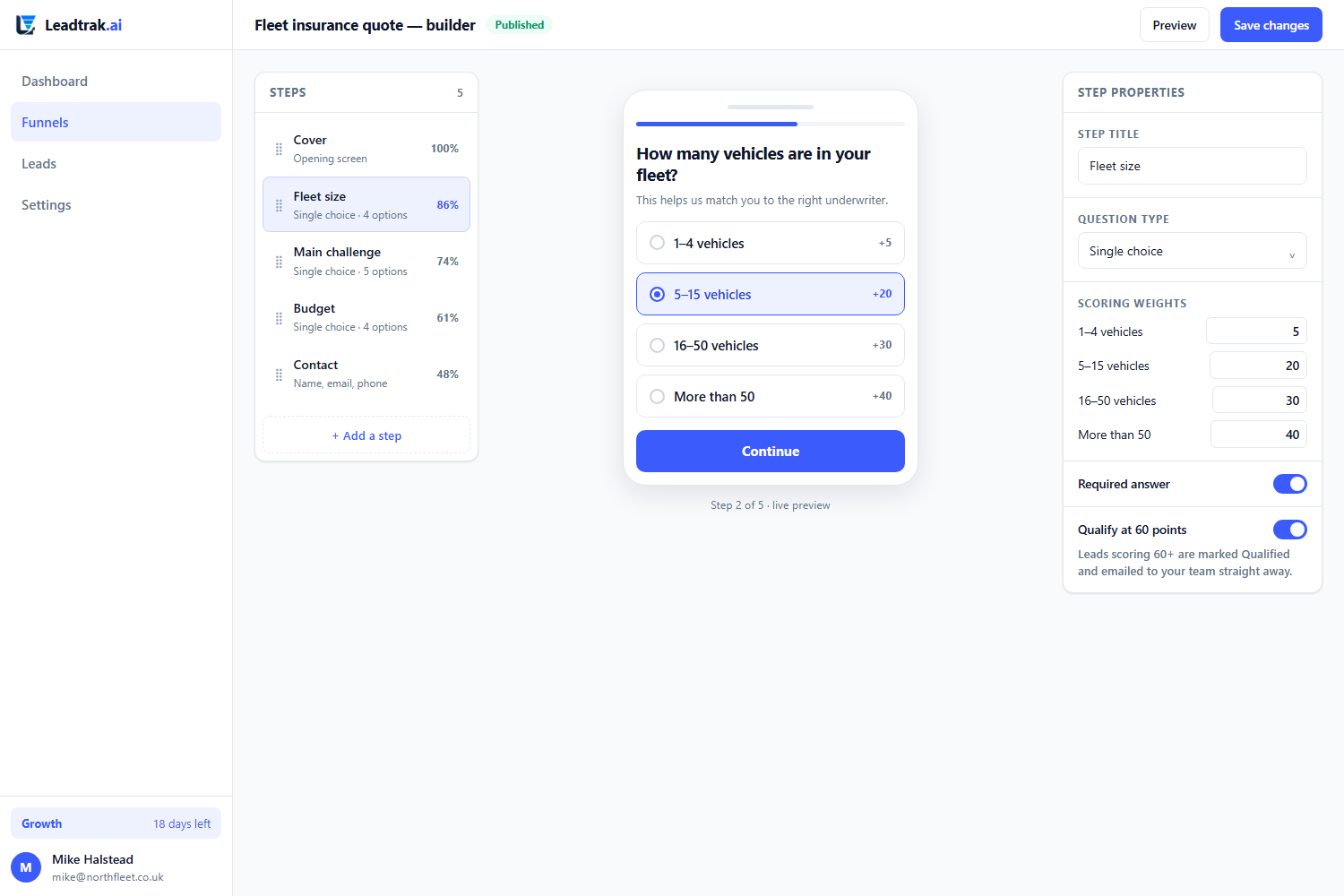
The funnel builder — drag steps, set scoring weights, publish to your own domain.
The funnel a visitor sees
It behaves like an app, because a form does not get finished
A funnel that reloads the page on every question feels like paperwork, and people abandon paperwork. Answering a Leadtrak funnel moves straight to the next screen — no reload, no white flash, no scroll position lost.
Instant between questions
The whole funnel is handed to the browser once, so moving between questions is immediate rather than a round trip. Screens slide, options arrive in sequence, and a swipe to the right goes back. Tapping an answer on a single-choice question moves you on by itself — one tap per question instead of two.
Answers that are pictures, not radio buttons
“What kind of property is it?” is a question people answer faster when they can see a detached house, a terrace and a flat. Every question can render as photo tiles, icon cards, a plain list or compact pills — set per question, not per funnel. Each option carries a short description under its label, so you can explain an option without adding a screen.
Still works with JavaScript off
The server renders the current step as a normal form underneath, and the runtime takes over when it loads. If a visitor blocks scripts, or the script is slow to arrive on a bad connection, the funnel keeps working one step per request and still captures the lead. Nothing about the experience is load-bearing on JavaScript.
Six looks, one decision
Pick Cinematic and your funnel becomes full-screen photography with the question over it. Pick Editorial and it becomes serif headlines on a calm palette. Clean, Bold, Soft and Midnight do the same job differently. Each one sets the layout, colours, type and motion together, so you change one thing and everything stays consistent — and every individual setting is still there underneath if you want it.
Nothing is lost if they stop half way
Answers are saved to your account as the visitor moves through, not held in the browser until the end. Someone who answers four questions and then closes the tab is already a partial record rather than nothing at all. If their connection drops mid-funnel, the answers are retried, and the final submission sends the complete set regardless.
Readable by design, not by accident
Button text is picked automatically as black or white depending on your brand colour, so a mid-yellow brand never ships white-on-yellow labels nobody can read. Type scales with the screen instead of jumping at breakpoints, tap targets stay at 48px, and the whole thing respects a visitor’s reduced-motion setting.
Why mobile-first
A mobile funnel builder is not a desktop builder with a smaller screen
Most lead funnel builders were designed for a 1440px monitor and then made to “work” on phones. Ours is the other way round. The canvas you edit on is a phone, because that is where the lead is standing when they tap your ad.
One question per screen
A visitor on a phone has one hand free and a short attention span. Asking one thing at a time keeps the tap target large, removes the need to scroll a long form, and lifts completion. You are not shrinking a survey — you are writing for the thumb.
Built on a phone canvas first
Steps are laid out on a narrow canvas and expanded upward to desktop, never the reverse. That forces you to decide what matters most, because you cannot fit twelve fields on one screen. The result is a shorter funnel that asks for less and converts more.
Inside the builder
What you can do without leaving the editor
The point of a lead funnel builder is to stop you stitching five tools together. These are the things you will actually use in week one.
Per-answer scoring weights
Attach a weight to every option, not just the lead as a whole. A lead who selects “within 30 days” and “budget over £10k” arrives already scored and already prioritised. The editor shows the highest score your funnel can award, so you can see at a glance whether your weighting actually reaches the top of the scale.
Branching and conditional steps
Every answer option carries a “then go to” dropdown: continue to the next step, jump ahead to a later one, or finish the funnel there and then. A homeowner gets the survey question; a tenant is sent straight to the contact step. You stop asking people questions that do not apply to them, which is the cheapest conversion win available.
Sliders with score bands
Budget and quantity questions are numbers, and a bare number tells your scorer nothing. A slider step asks “what is your monthly ad budget?” on a thumb-sized track, then bands the answer: under £1,000 scores nothing, £1,000–£4,999 scores 20, £5,000 and up scores 40. The visitor sees the band name as they drag — “£6,000 (Serious)” — and a band can carry the same “then go to” jump as any answer option, so a small budget can end the funnel politely instead of dragging someone through five more screens.
“Pick all that apply”, scored properly
Turn any question into a multi-select and the weights add up: a visitor who ticks Servicing (10) and MOT (5) arrives on 15, not on whichever one they happened to tap first. Set a minimum and a maximum — “choose 1 to 2 options” is shown to the visitor and enforced on the server, so a hand-crafted form post cannot get past it either. Selections that were never offered are discarded before scoring. Any option can still carry a “then go to” jump, and when two ticked options both carry one, the higher option in your list wins — precedence you can see, not a hidden rule. The score ceiling in the editor respects your maximum too, so a five-option question that only allows two picks does not advertise a total nobody can reach.
Finish somewhere useful, not on our thank-you card
Plenty of funnels should not end with “thanks, we’ll be in touch”. Add a Redirect to a URL step — or put a redirect URL on your thank-you step — and the visitor lands on your booking page, checkout or download the moment they finish. The URL can carry merge tags: {lead_id}, {score}, {email}, {name}, {phone}, {funnel}, all URL-encoded so a name with a space or an ampersand can never break your query string. Only http, https and site-relative paths are accepted; anything else is refused and the visitor sees the normal thank-you card instead. The lead is written and counted before the redirect, so a typo in a URL can only cost the last screen — never the lead.
One funnel, several languages
Translations live inside the funnel instead of forcing you to clone it per market. The visitor's language comes from ?lang=, their earlier choice, or their browser — and anything you have not translated yet falls back to your default language rather than rendering blank. Because only text is translatable, the score weights, branching and stored answers are identical in every language, so one report covers every market. How multi-language works.
It can look like your website in one step
Paste your website address and Leadtrak reads it: your colours, your logo, the typeface you actually use, and the photography already on your pages. Your real font is matched to the closest of eighteen we can serve rather than flattened to “a sans serif”, and your own photographs are preferred over stock wherever we find usable ones. The funnel arrives wearing your brand instead of our blue, and every setting stays editable afterwards. There is no Leadtrak watermark on a live funnel. Funnels live on a Leadtrak URL by default, and you can point your own domain at any live funnel — add it in the funnel’s Publish settings and point its CNAME at Leadtrak — or embed one on your own site with a one-line iframe snippet from the same screen.
Templates that arrive already designed
Start from a finished funnel for your sector instead of a blank canvas. Edit the copy, adjust the scoring, publish. The template library runs to twenty-one funnels across fourteen sectors, and eight of them ship fully art-directed — a look, real photography on the answer cards, and copy written the way a funnel that converts is actually written. The photographs come from a library of eighty-six that is checked automatically, so a template never renders a missing image.
Fast, because speed is conversion
There is no React, no Vue and no framework of any kind shipped to the visitor — the runtime is hand-written and the stylesheet is shared across every funnel, so it is cached once and reused. A published funnel comes to about 21KB compressed for the page, the stylesheet and the runtime together, against a hard budget of 150KB that a build gate checks on every change. Photographs and any web font you choose load from a CDN on top of that, and both are optional. Every hundred milliseconds you save is revenue you keep, and a slow funnel is the one thing no amount of copywriting fixes.
Landing pages
Sometimes you do not want a quiz — you want a page
The builder has two kinds of funnel. The quiz above is the one for scoring and branching. The other is a landing page: one scrollable canvas you fill by dragging blocks into order — a hero, proof, a logo strip, stats, an FAQ — and a lead-capture form that posts straight into your inbox. No steps, no branching, just a page a stranger lands on and fills in.
Drag blocks onto one canvas
Pick from hero, bullet list, feature cards, customer reviews, a logo / “trusted by” strip, headline stats, an FAQ and a call-to-action. Drop them in any order, drag to reorder, delete what you do not need. The page is the canvas — there is nothing else to configure.
Built for the lead-magnet play
The “Lead magnet” template ships a page that earns the click: a bold hero with a gated CTA, a row of real customer quotes, a “trusted by 5,000+” logo strip, three proof stats and an FAQ that answers the objection — then the form that hands over the download. The exact shape that turns ad spend into a name and an email.
The form posts to your leads
The enquiry form is a block like any other. Switch name, email and phone on or off, add your own custom fields, require consent, set the success message, and every submission lands in the same inbox as your scored funnels — no Zapier, no second tool. Consent and a valid email are enforced on the server, so a blank post never creates a lead.
Same speed, same brand
A landing page is server-rendered like everything else, so it inherits the same 150KB weight budget and the same brand styling. The page you build is the page that ships — what you see in the editor is what the visitor gets, fast.
Start from the template, or blank
Most people start from “Lead magnet” and swap in their own copy, logos and stats. The page settings panel holds the look-and-feel — brand colour, page width, density, corner rounding — and a blank canvas is there if you would rather build from scratch.
One inbox, two funnel kinds
Landing pages and scored quizzes live side by side in the same funnel list and feed the same lead inbox. Run a gated lead-magnet page to fill the top of the funnel and a scored quiz to qualify the hot ones — and report on both from one place.
Speed
We measure funnel weight in kilobytes, not promises
A funnel that takes four seconds to paint on a slow connection loses the lead before the first question renders. So speed is not a review item here, it is a test that fails the build. Every regression run measures the real running app over real HTTP and refuses to pass if a page goes over budget: time to first byte under one second, total page weight under 150KB counting the document and every asset it pulls, and the tracking pixel under 4KB gzipped.
Where we are against those budgets today: a published funnel measures 81KB uncompressed — 54% of the weight budget — across the document, the shared stylesheet and the runtime. Compressed, which is how it actually reaches a phone, that is about 21KB. The tracker is 1.6KB gzipped, 40% of its own budget. Photographs and any web font you pick load from a CDN on top, and both are optional. A broken stylesheet counts as a failure too, so a page can never look lighter by being broken.
The tracking pixel that powers attribution ships underneath the builder, so the speed work and the measurement work are the same work — you do not trade one for the other. A fast funnel and a measured funnel are the same funnel.
The budget is a test, not an aspiration. It runs against the live app on every regression run, and a page that exceeds it fails.
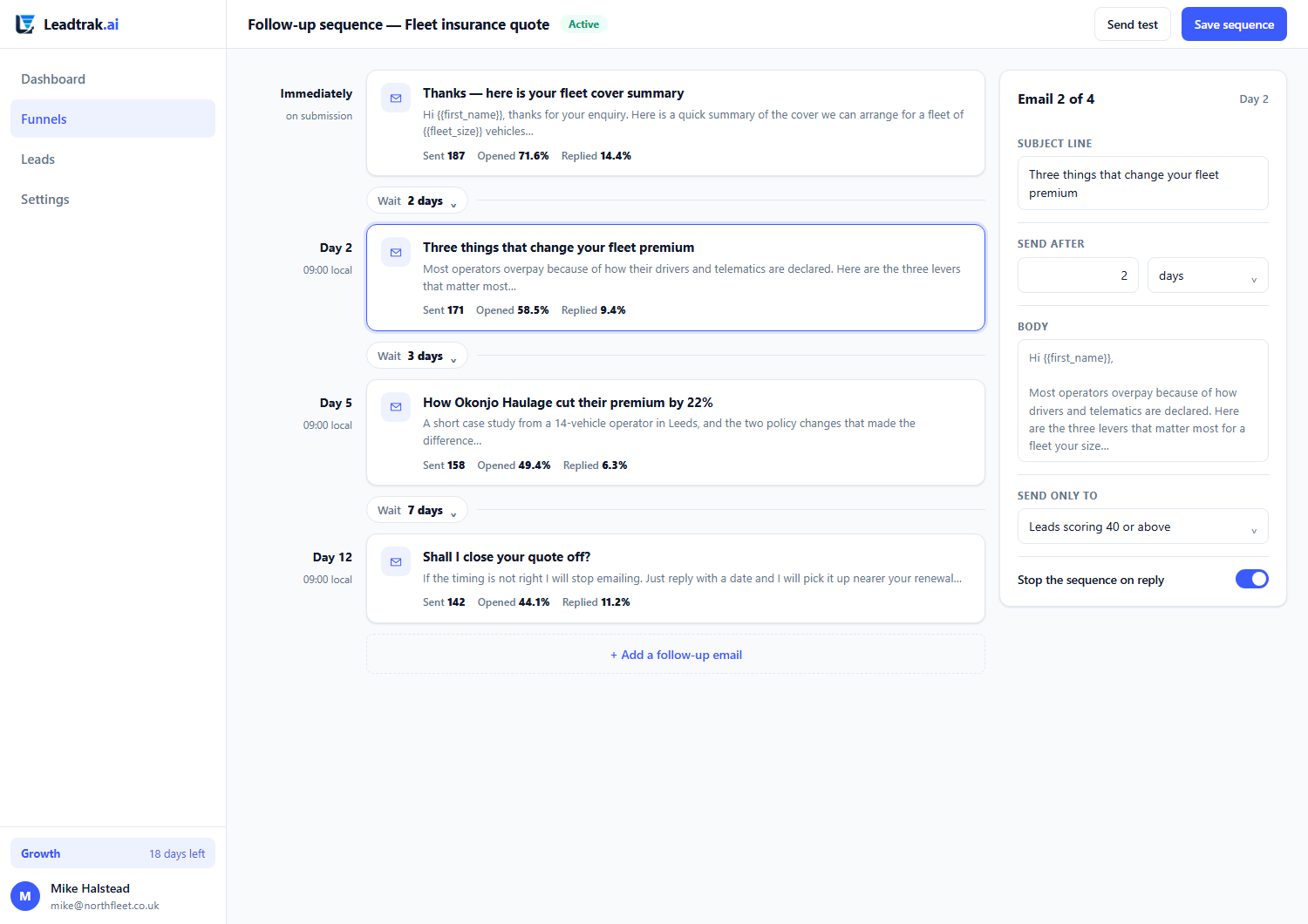
The sequence builder — branching, scoring weights and conditional steps in one view.
Questions
The things people ask about the builder
Can I really build a funnel on my phone?
Yes. The editor is a phone canvas. You can add steps, set scoring weights, reorder and publish from a handset. Most customers start a funnel at a desk and finish it on the move, which is the whole point of a mobile funnel builder.
Do I have to write code to branch the funnel?
No. Conditional steps are set with dropdowns in the editor: pick an answer option, choose whether it continues to the next step, jumps to a later step, or finishes the funnel. Backwards jumps are rejected, so a funnel can never loop a visitor round in a circle.
What happens to a lead if my enrichment API is slow?
The lead is written to the database before any processing runs. Validation, deduplication and enrichment all happen behind that write, so a slow third-party call can never cost you the enquiry. A lead is never lost to a sluggish integration.
Can I use my own domain and branding?
Yes to both. Your logo, colours and typography apply to every published funnel and there is no Leadtrak watermark. Point your own domain at any live funnel from the funnel’s Publish settings — add the domain, set its CNAME to Leadtrak, and visitors reach the funnel on your brand — or copy the one-line iframe snippet from the same screen to drop the funnel into any page on your own site.
How do I score a budget or quantity question?
With a slider step. You set the range, the step size and a unit (£ before the number, “vehicles” after it), then define score bands: a range of values, the points it is worth, and an optional label the visitor sees as they drag. Bands are matched top to bottom and the first match wins, so overlapping bands are decided by the order you put them in rather than by a hidden rule. A band can also jump the visitor to a later step or end the funnel, exactly like an answer option. If no band matches, the answer scores zero — Leadtrak never invents a number.
Can a question let people choose more than one answer?
Yes. Tick “allow multiple answers” on a choice question and it renders as checkboxes instead of buttons. Every ticked option’s weight is added together, so “pick all that apply” still produces a single, honest score. You can set a minimum and a maximum number of selections; the visitor sees the rule (“choose 1 to 2 options”) and the server enforces it independently, so it holds even if someone bypasses the page. Anything submitted that you did not offer is discarded before scoring, and options can still carry branching jumps — if two ticked options both declare one, the one higher in your option list wins. The editor’s maximum-score readout applies your selection cap, so it never shows a total the maximum makes unreachable.
Can I send people to my booking page or checkout when they finish?
Yes. Add a “Redirect to a URL” step as the last step, or put a redirect URL on your thank-you step, and the visitor is sent straight there on completion. The URL can include {lead_id}, {score}, {email}, {name}, {phone} and {funnel}, each URL-encoded so the query string stays valid whatever the visitor typed. Only http, https and site-relative paths are allowed — anything else is refused and the thank-you card is shown instead. The lead is saved and the completion counted before the redirect happens, so a bad URL can never lose you a lead.
Can I build a simple landing page instead of a quiz?
Yes. When you create a funnel you can start from the “Lead magnet” template, which builds a single scrollable landing page rather than a scored quiz. You drag blocks — hero, reviews, a logo strip, stats, FAQ — into order and add a lead-capture form that posts straight into your inbox. There are no steps and no branching; it is just a page. It shares the same branding, speed budget and lead inbox as the quiz funnels.
Once your brand voice is set (business name, audience and tone, under Settings → Brand), a single Rewrite copy for my business button rewrites every heading, button label and line of page copy to sound like you wrote it — without touching the structure, your scoring or your form fields. The wording is the one thing that should never read like a template.
How is scoring different from a normal form?
A form collects answers. Leadtrak attaches a weight to each answer and totals it into a lead score the moment the submission lands. Your team sees the score, not just the fields, so they know which leads to call first.
Build your first mobile funnel this afternoon
Thirty days of full Growth access, no credit card, and a permanent free plan waiting at day 31. Your funnels and leads are never deleted.